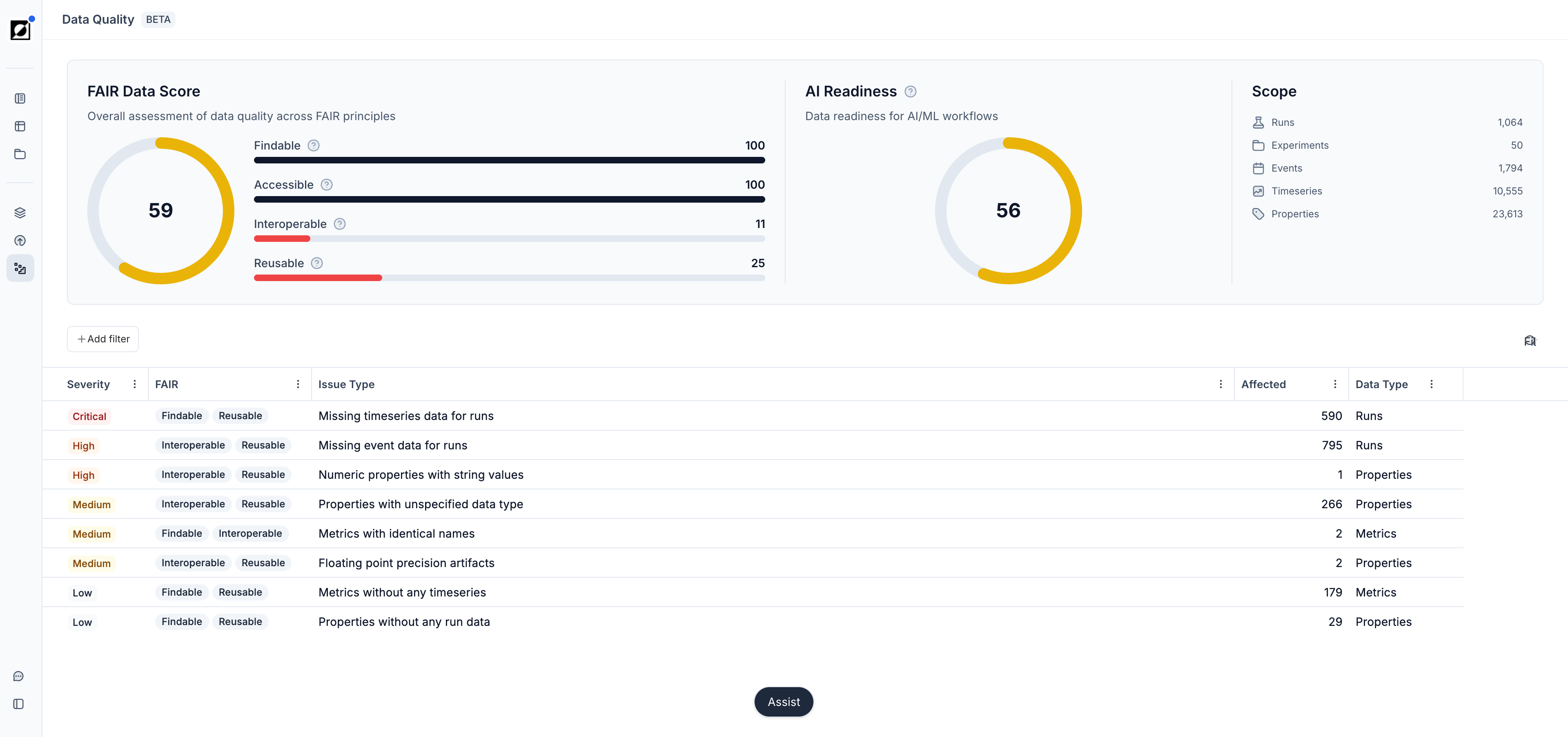
Summary cards
- FAIR Data Score — how well your data conforms to the FAIR principles. Each pillar is scored, and the gauge shows the average. Hover over a pillar for its measure. Findable counts runs that are in an experiment, Interoperable counts data that has parent metrics, and Reusable counts runs that have events. Accessible is satisfied for all workspaces. To improve the score, put runs into experiments, add events, and group metrics under parent metrics.
- AI Readiness — how well the data supports AI/ML workflows. The score combines the distinctiveness of metric names and property values, the presence of property values, and how much of your data reports use. If Assist is not enabled for your organization, the card asks you to contact Invert through Help & Support.
- Scope — the volume of data that the assessment covers: runs, experiments, events, timeseries, and properties.
Data issues
The list gives one row per issue, sorted by severity. The columns are Severity, FAIR (the affected pillars), Issue Type, Affected (the number of affected entities), and Data Type.
Use Add filter to filter by project, severity, FAIR pillar, or data type. Use the search control to find an issue by title, severity, data type, or FAIR pillar.
Issues cover missing metadata, runs without timeseries or events, experiments without runs, duplicate metric or property names, properties with the wrong or unspecified data type, and metrics or properties that no run data uses.
Issue details
Click an issue to open it. The page gives the severity, the FAIR pillars, a description of the effect on your work, and the recommended actions. It also lists the affected runs, experiments, metrics, or properties, each linked to the entity in Invert.
Some issues can be corrected on the page: Group into Parent for duplicate names, conversion of numeric values that are stored as text, Update all or Review individually for suggested data types, rounding for floating point artifacts, and Archive all for entities that no data uses. For the other issues, Review & Resolve opens the affected data in Invert with the filters applied, so you can correct it in context.