Until now, an import that stopped short surfaced nowhere unless you went looking for it. You moved on assuming your data was in Invert, and found out otherwise later, when the numbers you expected weren't there. The alternative was keeping the tab open and refreshing.
Invert now notifies you when an import needs your attention.
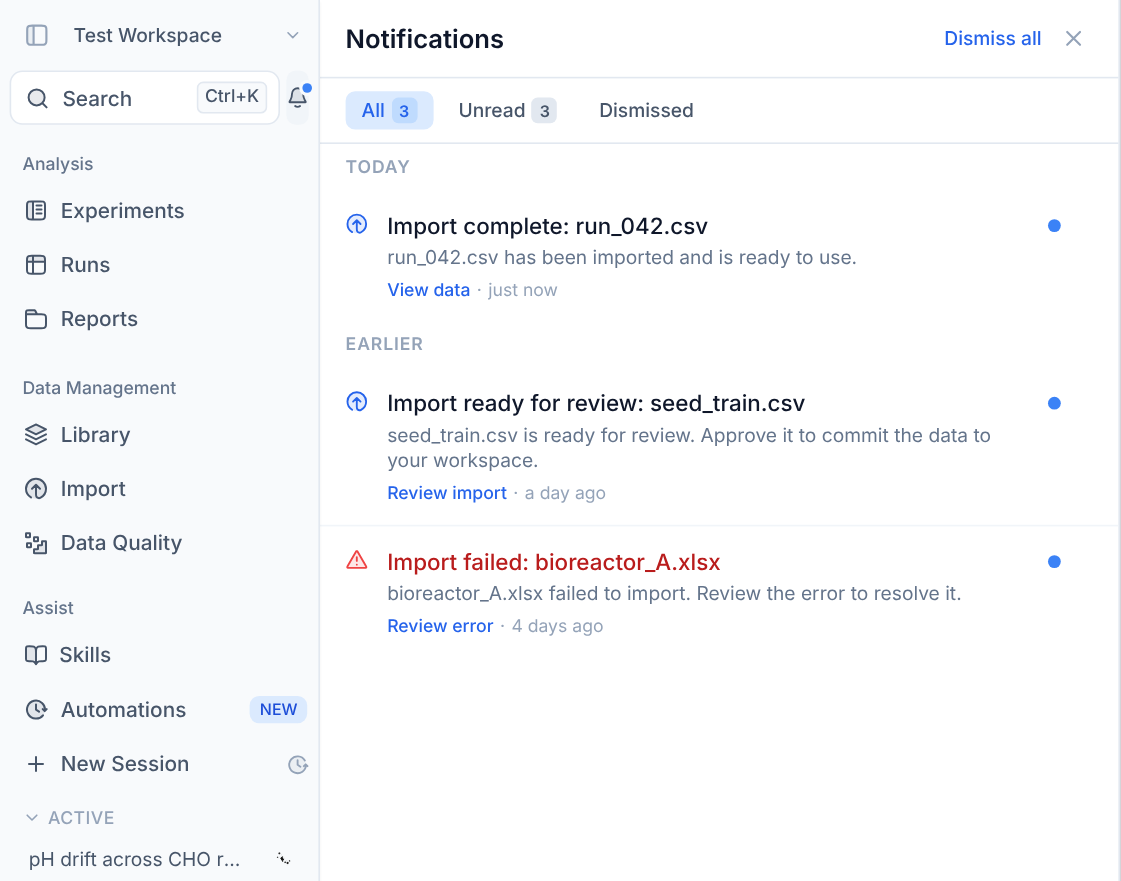
In the app. A notification center in the left sidebar, with an unread badge. Open it to see what happened, grouped by day, with a link straight to the import. Notifications persist until you act on them: mark them read, dismiss them one by one, clear everything with Dismiss all, or filter to unread.
In your inbox. The same notifications go to the address on your account, with the same action button linking back to the right page in Invert. Emails arrive whether or not you have Invert open.
What you'll be notified about. Imports first, since they run long and often need a decision partway through:
- Import complete: your data is ready to use. View data.
- Import failed: something went wrong. Review error.
- Import ready for review: the preview is ready and needs your approval before the data commits. Review import.
Nothing to set up. Notifications appear automatically for imports you trigger.
Available now for all Invert customers.